← How to Clear Cache in Safari on iPhone, iPad, and Mac: A Step-by-Step Guide How to Recover Permanently Deleted Files from Google Drive: A Step-by-Step Guide →
Losing an unsaved Microsoft Word document can feel like a disaster, especially when hours of work vanish after a crash, power failure, or accidental closure. Fortunately, Word includes built-in recovery features that can restore unsaved files in many situations. This tutorial explains how to recover unsaved Word documents on both Windows and Mac systems using AutoRecovery, temporary file locations, and manual search techniques. You will learn where Word stores recovery data and how to retrieve it step by step.
Step 1: Check the AutoRecovery Pane in Word
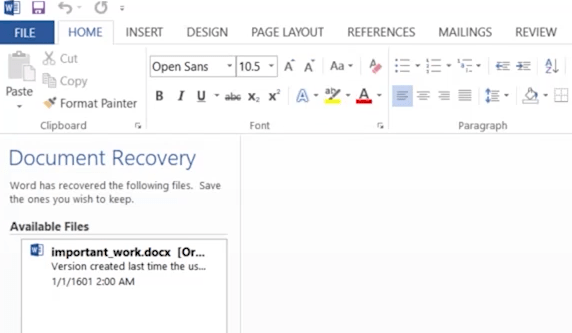
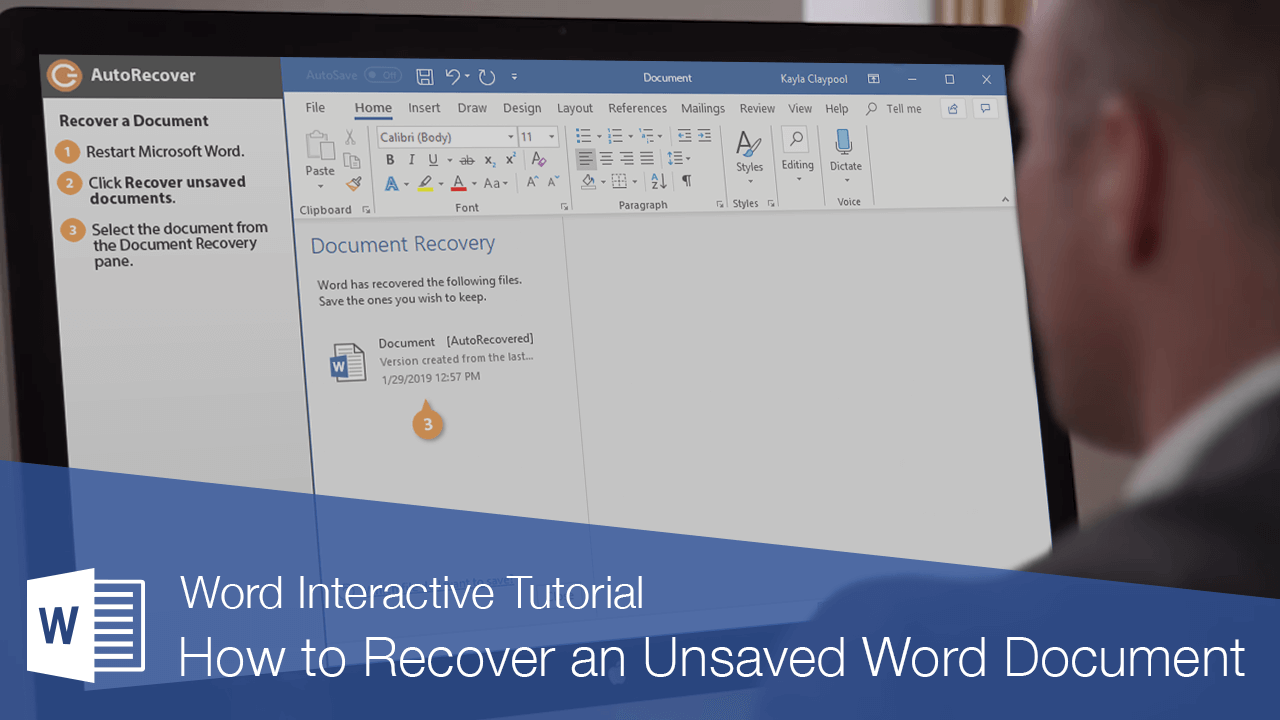
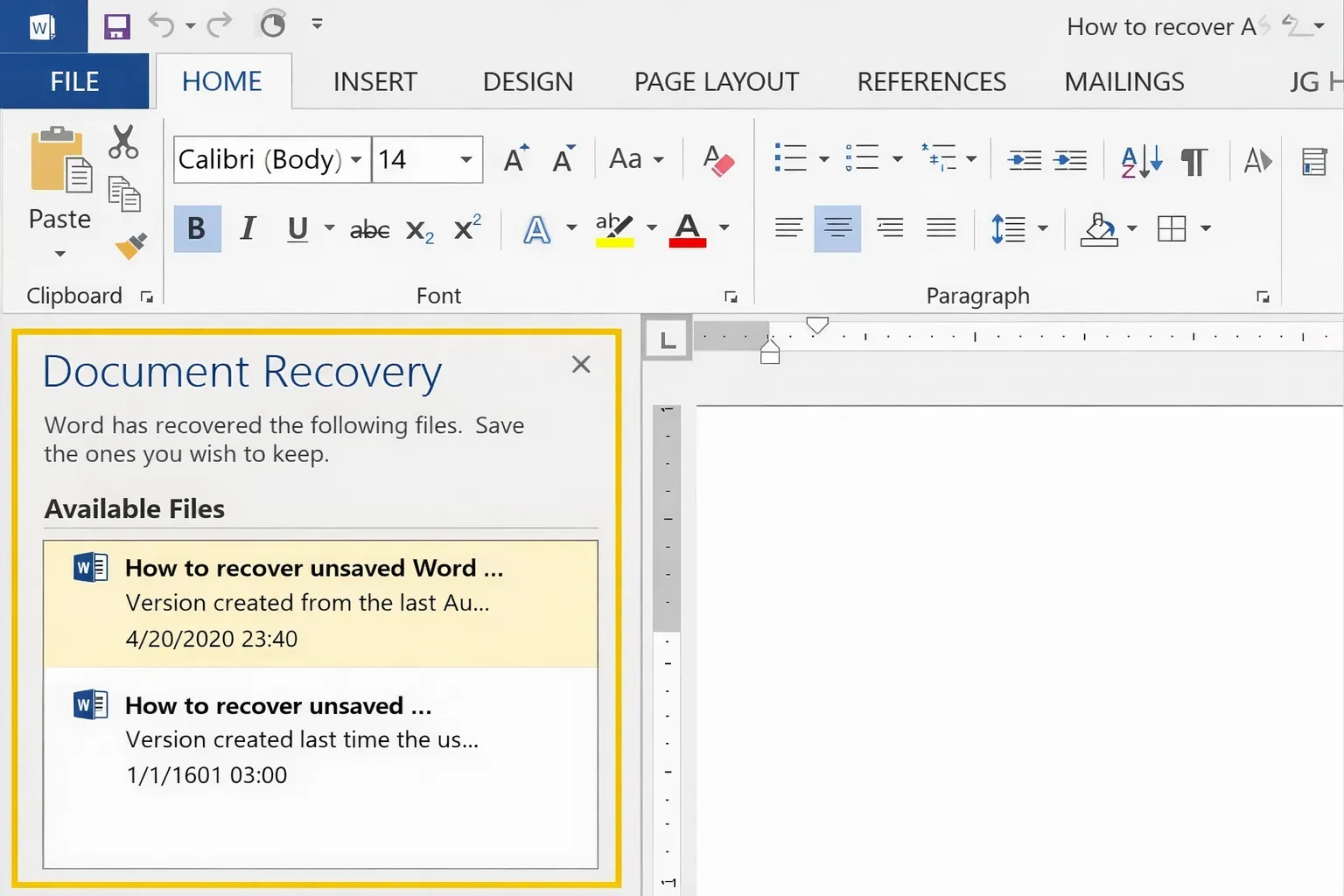
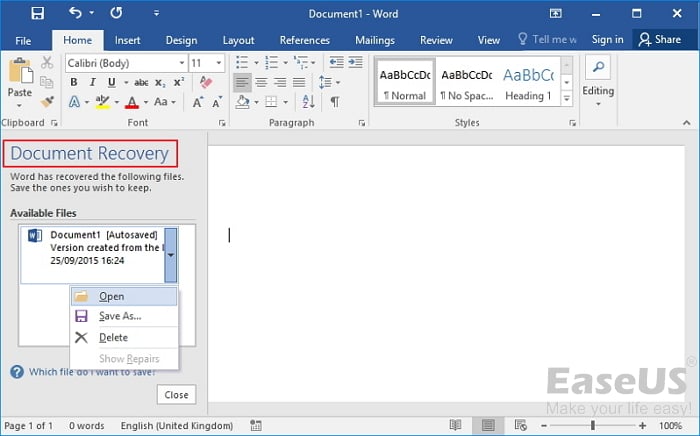
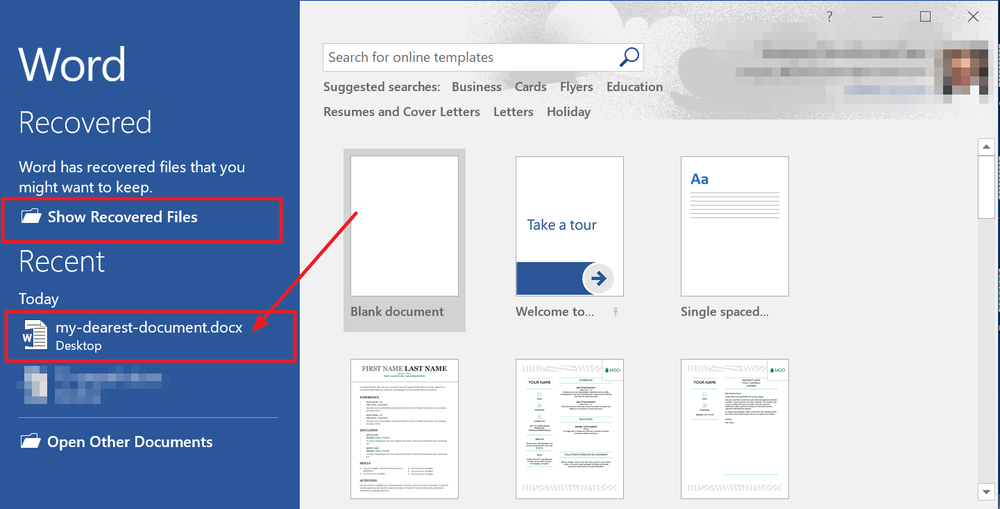
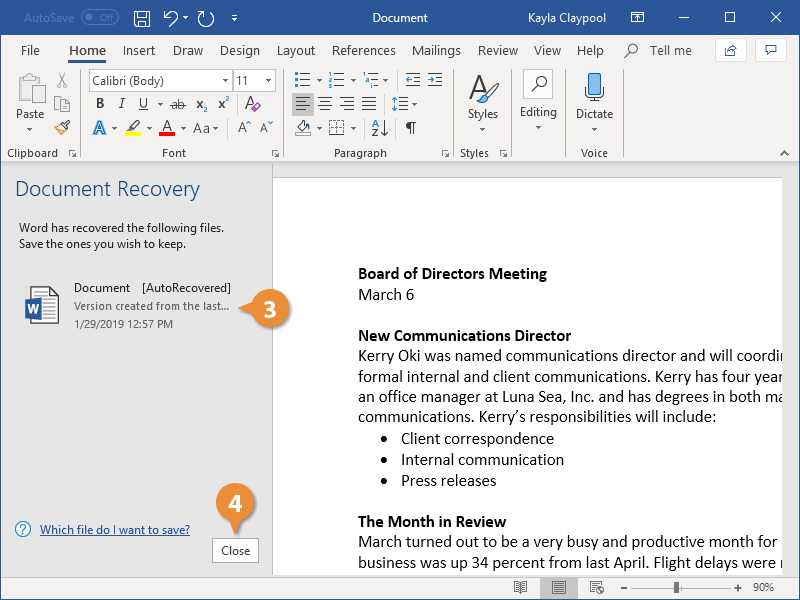
When Word restarts after an unexpected shutdown, it often displays a Document Recovery pane on the left side of the window. This pane lists files that were open when the program closed abnormally. Open Word, look for the recovery pane, and click the dropdown arrow next to the file you want to restore. Select "Save As" to store the recovered version in a safe location. If the pane does not appear automatically, proceed to the next step.
Step 2: Browse the Unsaved Files Folder in Word
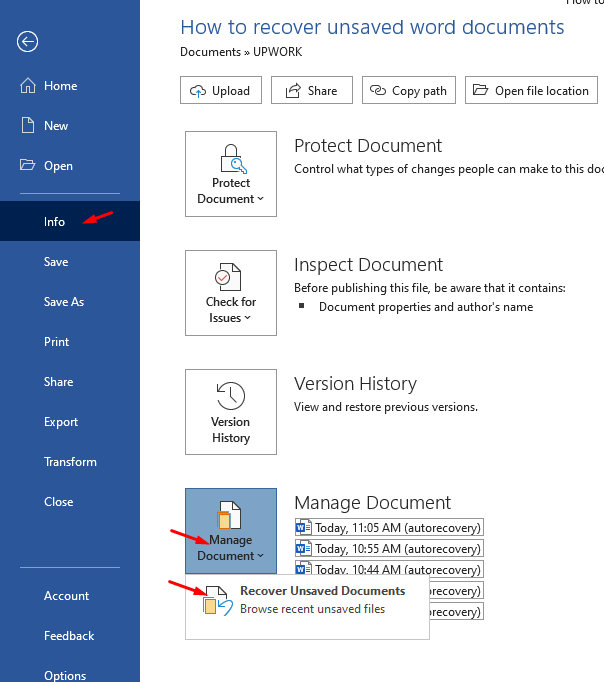
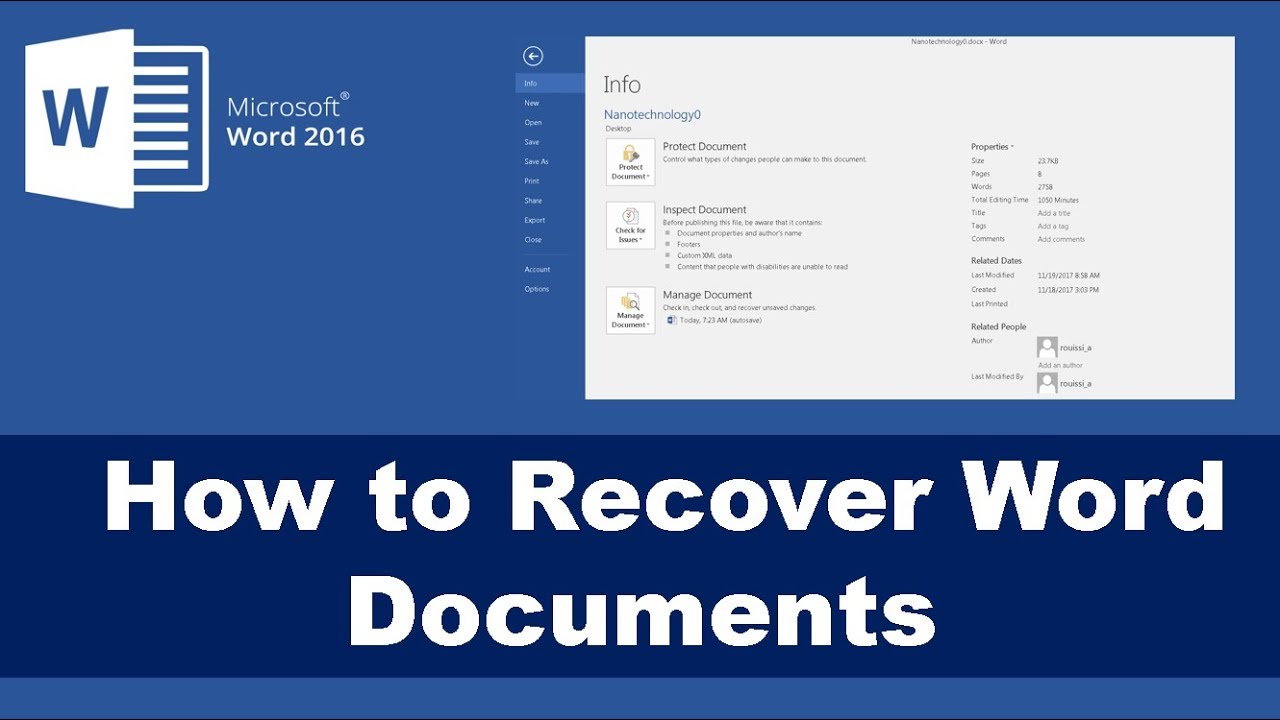
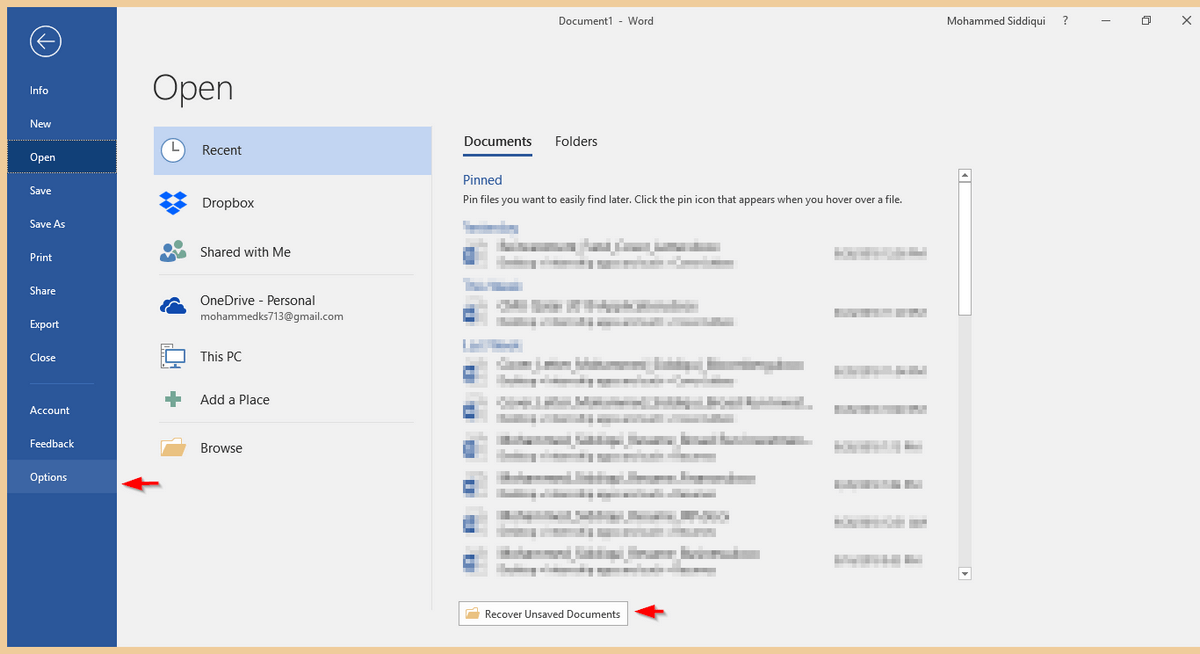
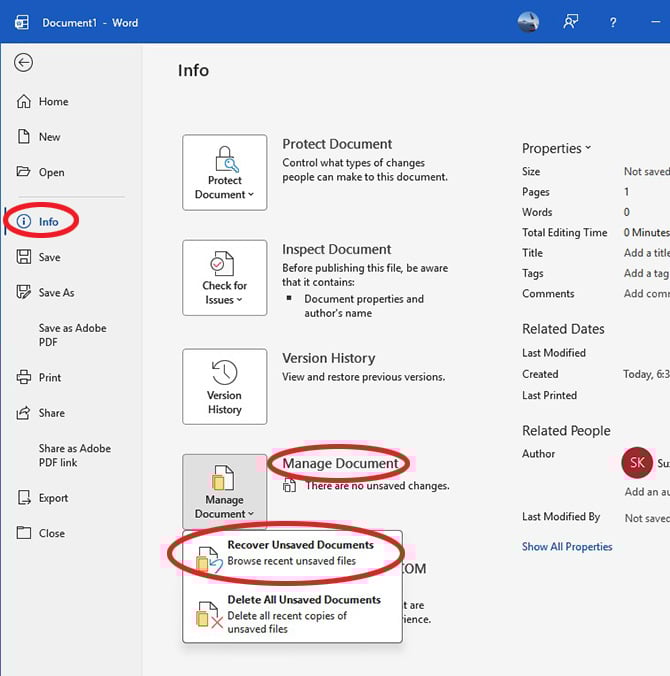
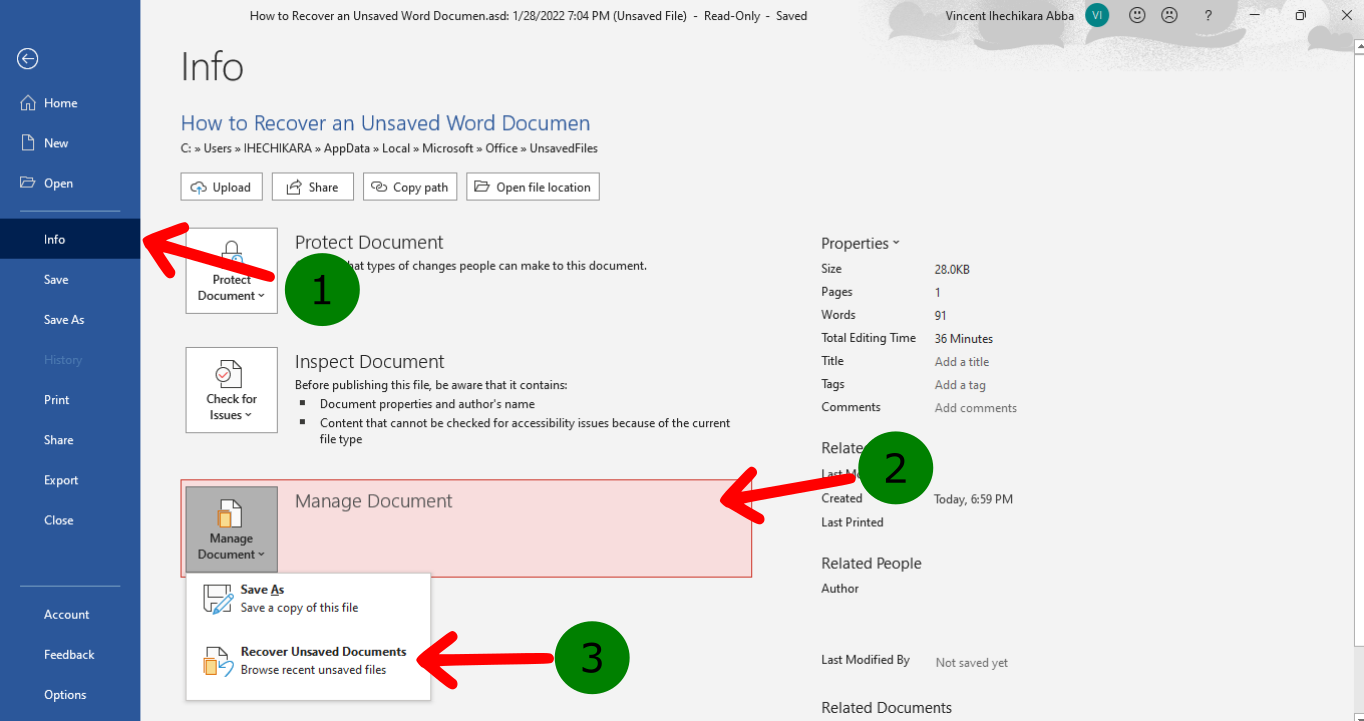
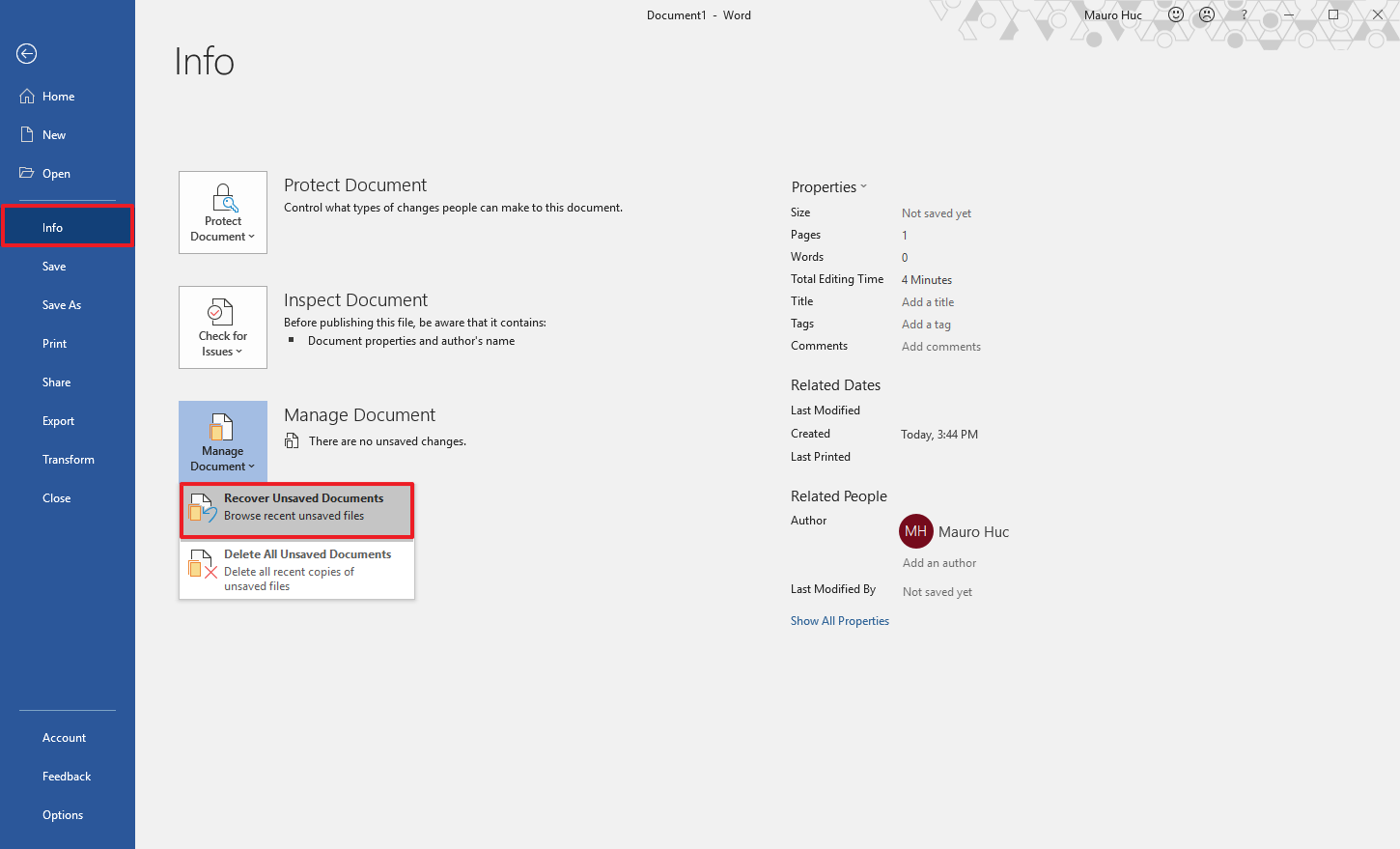
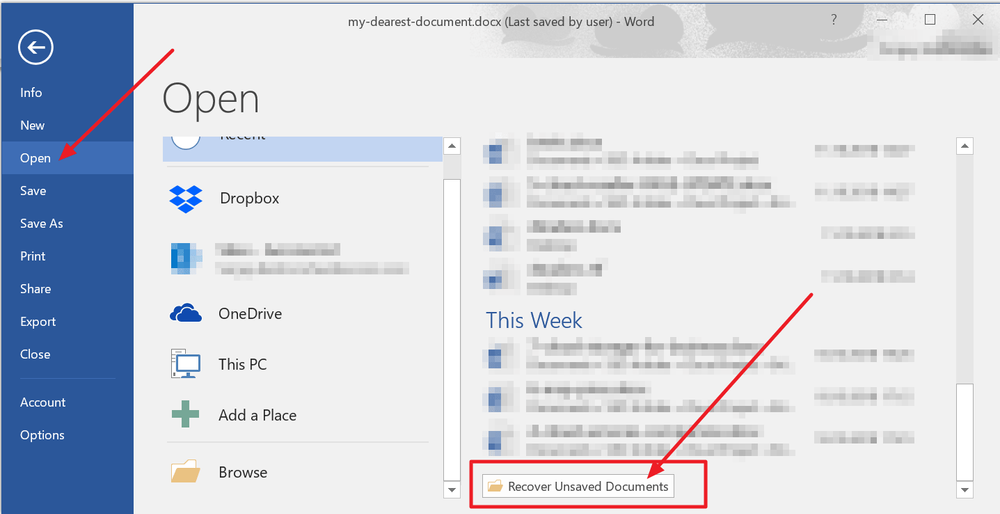
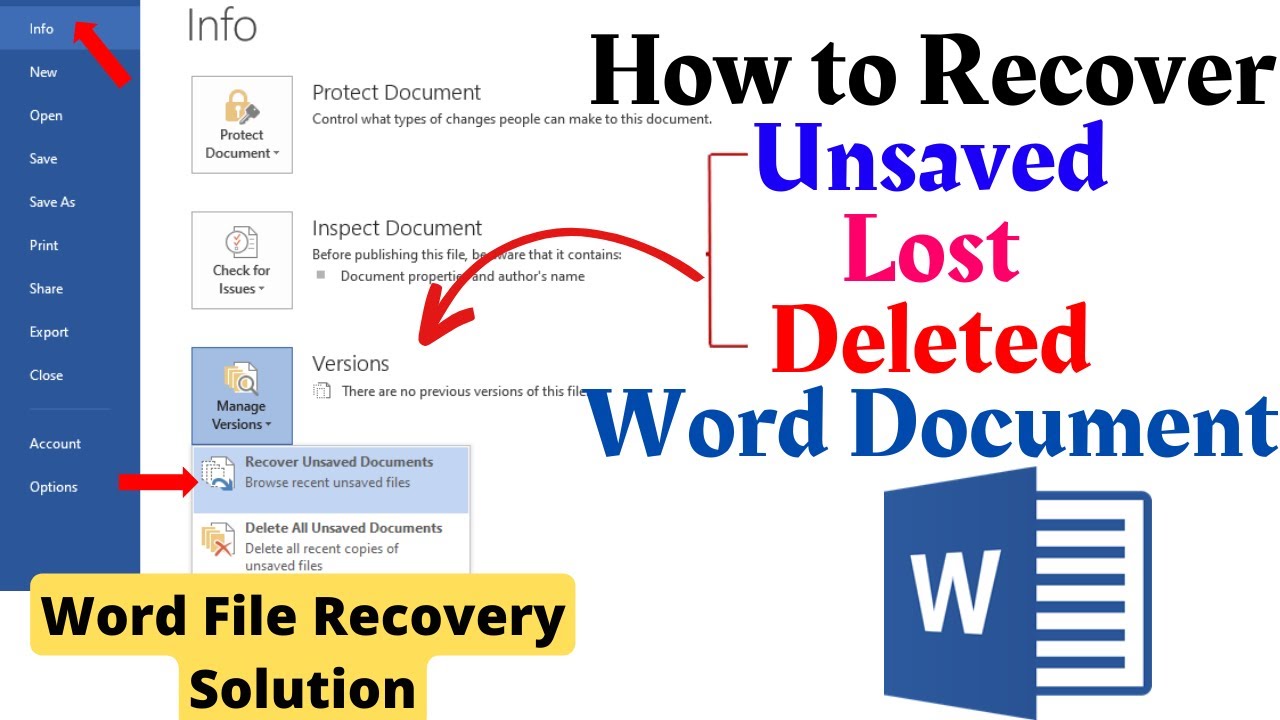
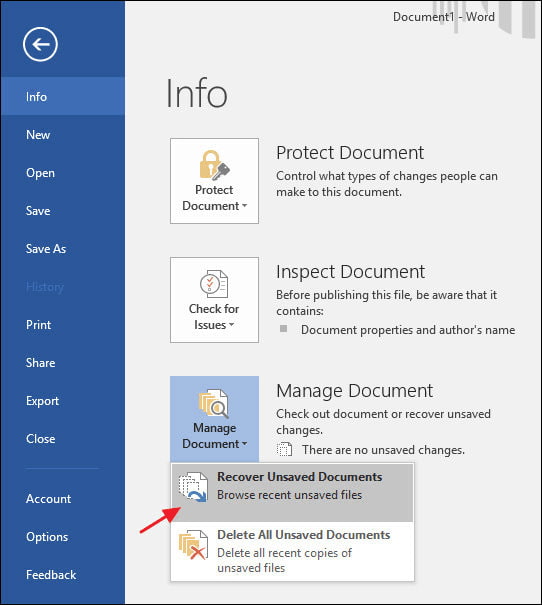
Word maintains a dedicated folder for documents that were closed without saving. Open Word, go to the File menu, and click Open. On Windows, select the "Recent" tab and click "Recover Unsaved Documents" at the bottom. On Mac, choose "Recover Unsaved Documents" from the Open dialog. A file browser will appear showing files with an .asd extension. Select the file that matches your lost document and click Open. Word will then load the recovered content, allowing you to save it normally.
Step 3: Locate Temporary Files Manually
If the recovery pane and unsaved files folder do not contain your document, search the system's temporary file directories. On Windows, open File Explorer and navigate to C:\Users\[YourUsername]\AppData\Local\Microsoft\Office\UnsavedFiles. You can also search for files ending in .asd or .tmp in C:\Users\[YourUsername]\AppData\Local\Temp. On Mac, open Finder, press Command+Shift+G, and go to ~/Library/Containers/com.microsoft.Word/Data/Library/Preferences/AutoRecovery. Look for files with recent timestamps and open them with Word.
Step 4: Use the "Open and Repair" Feature
Sometimes a recovered file is corrupted or fails to open. In that case, use Word's built-in repair tool. Click File, then Open, and browse to the recovered file. Instead of double-clicking, select the file, click the dropdown arrow next to the Open button, and choose "Open and Repair." Word will attempt to fix the document structure and display the content. Once repaired, immediately save the file under a new name to prevent further data loss.
Step 5: Search for Backup Copies and Previous Versions
Windows and Mac both keep backup copies of documents through File History, Time Machine, or OneDrive version history. On Windows, right-click the folder where the original document was saved and select "Restore previous versions." On Mac, open Time Machine and browse to the folder. If you saved the file to OneDrive, sign in to the OneDrive website, right-click the file, and choose "Version history" to restore an earlier autosaved version. These backups can recover content even when AutoRecovery fails.
Step 6: Prevent Future Data Loss
After recovering your document, adjust Word's settings to reduce the risk of losing unsaved work again. Go to File > Options > Save and set the AutoRecover interval to 1 or 2 minutes. Enable "Keep the last autosaved version if I close without saving" and confirm that AutoRecovery is active. Save your work frequently using Ctrl+S or Command+S, and consider storing critical files in a cloud service that maintains automatic version history.
How To Recover Unsaved Word Document [Windows & Mac]
![How to Recover Unsaved Word Document [Windows & Mac]](https://img.swifdoo.com/image/recover-unsaved-word-documnet.png)
How to Recover Unsaved Word Document [Windows & Mac]
How To Recover Unsaved Word Documents On Windows And Mac

How to Recover Unsaved Word Documents on Windows and Mac
Unsaved
Unsaved
Build A Tips About How To Recover An Unsaved Document In Word
Build A Tips About How To Recover An Unsaved Document In Word ...
Word Restore Unsaved : Recover Unsaved Word Document Mac Without
Word Restore Unsaved : Recover Unsaved Word Document Mac Without ...
How To Recover Unsaved Word Documents? Rescue The Fruits Of Your Labor

How to Recover Unsaved Word Documents? Rescue the fruits of your labor ...
How To Recover Unsaved Word Documents - Always Networks

How to Recover Unsaved Word Documents - Always Networks
10 Effective Ways To Recover Unsaved & Deleted Word Document
10 Effective Ways to Recover Unsaved & Deleted Word Document
How To Recover Unsaved Word Documents On Your Computer

How To Recover Unsaved Word Documents On Your Computer
How To Restore Unsaved Documents - Structuretext
How To Restore Unsaved Documents - Structuretext
How To Recover Unsaved Word Document: 5 Proven Ways
How to Recover Unsaved Word Document: 5 Proven Ways
How To Restore Unsaved Documents - Structuretext
How To Restore Unsaved Documents - Structuretext
Word Crashed? How To Recover An Unsaved Word Document - Techlicious
Word Crashed? How to Recover an Unsaved Word Document - Techlicious
How To Recover Unsaved Word Documents: 7 Methods That Actually Work
How to Recover Unsaved Word Documents: 7 Methods That Actually Work ...
7 Ways To Recover Unsaved Word Files On Windows [2025]
![7 Ways to Recover Unsaved Word Files on Windows [2025]](https://www.aiseesoft.com/images/youtube-video/recover-word.jpg)
7 Ways to Recover Unsaved Word Files on Windows [2025]
How To Recover A Deleted File In Vs Code - Dibujos Cute Para Imprimir

How To Recover A Deleted File In Vs Code - Dibujos Cute Para Imprimir
How To Recover An Unsaved Word Document – Restore A Deleted Word File
How to Recover an Unsaved Word Document – Restore a Deleted Word File
How To Recover An Unsaved Word Document: Recovery Guide For Windows And Mac

How to Recover an Unsaved Word Document: Recovery Guide for Windows and Mac
How To Recover Unsaved Word Documents – Orion

How To Recover Unsaved Word Documents – Orion
How To Recover Unsaved Documents In Office | Windows Central
How to recover unsaved documents in Office | Windows Central
How To Recover Unsaved Or Deleted Word Document? [5 WAYS] (100% Working
![How to Recover Unsaved or Deleted Word Document? [5 WAYS] (100% Working](https://i.ytimg.com/vi/Lq3efroRVgk/maxresdefault.jpg)
How to Recover Unsaved or Deleted Word Document? [5 WAYS] (100% Working ...
How To Recover Unsaved Documents In Office | Windows Central

How to recover unsaved documents in Office | Windows Central
How To Recover An Unsaved/Deleted Word Document? - Ultimate Guide In 2024
How to Recover an Unsaved/Deleted Word Document? - Ultimate Guide in 2024
How To Recover An Unsaved Word Document?[2024 Guide]
![How to Recover an Unsaved Word Document?[2024 Guide]](https://images.wondershare.com/recoverit/article/2020/07/recover-unsaved-documents.jpg)
How to Recover an Unsaved Word Document?[2024 Guide]
How Do I Retrieve An Unsaved Word Document | Detroit Chinatown
How Do I Retrieve An Unsaved Word Document | Detroit Chinatown
How Do I Recover My Office 365 Product Key - Dibujos Cute Para Imprimir
How Do I Recover My Office 365 Product Key - Dibujos Cute Para Imprimir
How To Recover Unsaved Word Document - Solved - SmartPanels
How to Recover Unsaved Word Document - Solved - SmartPanels
How To Recover An Unsaved/Deleted Word Document? - Ultimate Guide In 2024
How to Recover an Unsaved/Deleted Word Document? - Ultimate Guide in 2024
How To Recover Unsaved Word Document | CustomGuide
How to Recover Unsaved Word Document | CustomGuide
Recover Unsaved Documents
Recover Unsaved Documents
How To Recover Unsaved Word Documents On Your Computer

How To Recover Unsaved Word Documents On Your Computer
How To Recover An Unsaved Word Document
:max_bytes(150000):strip_icc()/Webp.net-resizeimage3-5b75095bc9e77c0050130ee6.jpg)
How to Recover an Unsaved Word Document
How To Recover An Unsaved Word Document – Artofit

How to recover an unsaved word document – Artofit