← How to Fix Instagram Not Letting You Follow: Step-by-Step Troubleshooting Guide How to See Who Unfollowed You on Instagram in 2025: A Complete Step-by-Step Guide →
This tutorial explains how to save TikTok videos without the watermark using free online tools. You will learn how to copy the correct video link, paste it into a browser-based downloader, and save a clean MP4 file to your phone or computer. The process works on both mobile devices and desktop browsers, and it does not require installing any software or paying for a subscription. Follow the steps below to remove the TikTok username and logo from your saved clips.
Step 1: Copy the TikTok Video Link
Open the TikTok app on your phone or go to tiktok.com in a desktop browser. Find the video you want to download and tap the Share button, which looks like a curved arrow on the right side of the screen. On a phone, select Copy Link from the share menu and wait for the on-screen confirmation that the link has been copied. On a desktop, click the address bar while the video is open and copy the full URL. Make sure the copied link is complete and not truncated, because an incomplete link may prevent the downloader from locating the correct video. Keep the link ready for the next step; you can paste it into a notes app temporarily if you need to switch devices.

Step 2: Paste the Link Into a Watermark-Free Downloader
Open a new tab in your mobile or desktop browser and navigate to a free TikTok video downloader that supports watermark removal. Look for a tool that offers a clear input field and a no-watermark or clean download option. Paste the link you copied into the input field. Before clicking download, check the output settings and select MP4 as the file format if the choice is available. Choose the option labeled without watermark, no watermark, or clean video. Click the Download or Convert button and wait while the service fetches and processes the video. When the preview or download link appears, review the file and save it to your device. The saved video should look clean without the TikTok logo moving across the screen.

If the downloader does not work on the first attempt, try refreshing the page or using a different browser. Some free tools may show an ad or ask you to wait a few seconds before the download begins. Always respect copyright and the original creator’s permissions when you reuse downloaded videos.
How To Download TikTok Videos Without Watermark On IPhone
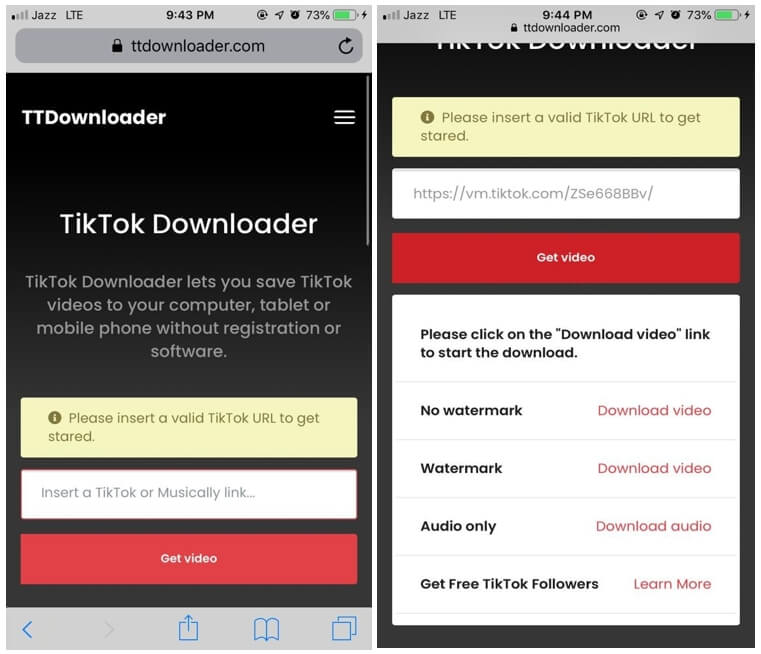
How to Download TikTok Videos Without Watermark on iPhone