← How to Download TikTok Videos Without a Watermark: A Simple Step-by-Step Guide Google Meet Microphone Not Working? Step-by-Step Troubleshooting Guide →
Keeping track of your Instagram audience is important for personal branding, engagement analysis, and account management. This tutorial will walk you through practical methods to identify accounts that have unfollowed you, explain how third-party analytics tools can help, and show you how to interpret the results safely. By the end of this guide, you will understand how to compare your follower and following lists, spot recent unfollowers, and maintain better control over your Instagram connections.
Step 1: Connect a Trusted Instagram Analytics Tool
Instagram does not provide a built-in feature that notifies you when someone unfollows you. To see unfollowers, you need a third-party analytics app or service that can safely access your follower and following lists through Instagram's official login. FollowMeter, for example, is a popular option that organizes your audience data into clear categories, including recent unfollowers, accounts you follow that do not follow back, and new followers. Before connecting any tool, verify that it uses Instagram's secure authentication method and does not ask for your password directly. After logging in, allow the app to read your follower and following data. The dashboard will then display a list of users who were previously following you but have since stopped. Keep in mind that Instagram's API policies may limit how far back the app can track changes, so it is best to open the app regularly to capture new unfollowers before they disappear from the tracking window.

Step 2: Compare Your Follower and Following Lists Manually or Use a Visual Walkthrough
If you prefer not to rely on third-party tools, you can manually identify unfollowers by comparing your current followers with your following list. Start by opening your Instagram profile and writing down or screenshotting the accounts you follow. Then open your followers list and check whether each account you follow appears there. If you follow an account but it does not appear in your followers list, that account is not following you back. To identify someone who unfollowed you recently, you need a baseline, such as a previous list of your followers. Third-party tools automate this comparison and keep historical snapshots, which makes the process faster and more accurate. For a more detailed demonstration, you can view step-by-step video tutorials that show exactly where to find these lists and how to interpret changes over time. Always remember that some accounts may temporarily deactivate or change usernames, which can appear as unfollows even when the person has not intentionally unfollowed you.

Regularly reviewing your follower changes helps you maintain a healthy Instagram presence. While no method is completely foolproof, combining a reliable analytics tool with periodic manual checks gives you a clearer picture of your audience and helps you respond to changes in your follower base more effectively.
How To See Who Unfollowed You On Instagram - Tech Junkie
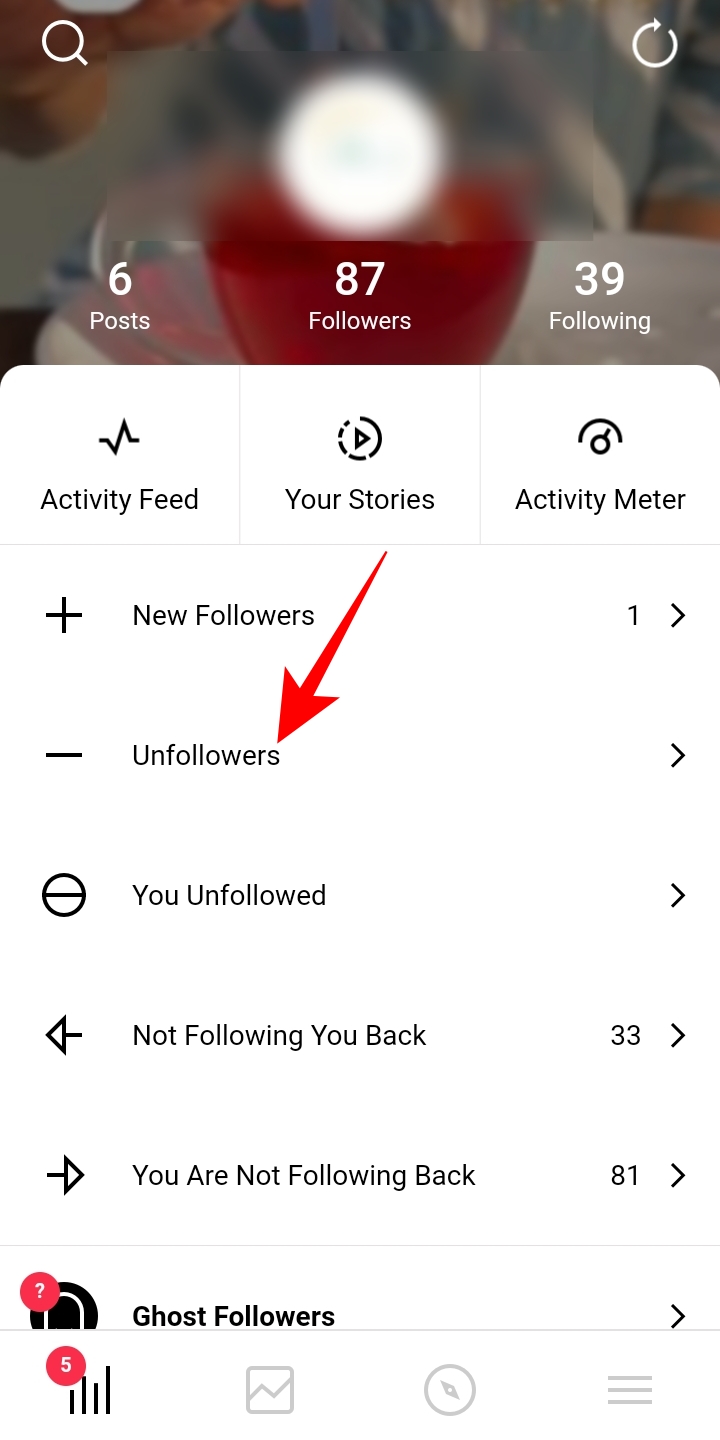
How to See Who Unfollowed You on Instagram - Tech Junkie