← How to Fix Microsoft Store Not Downloading Apps in Windows 11 How to Recover Deleted Photos on Android: Step-by-Step Guide →
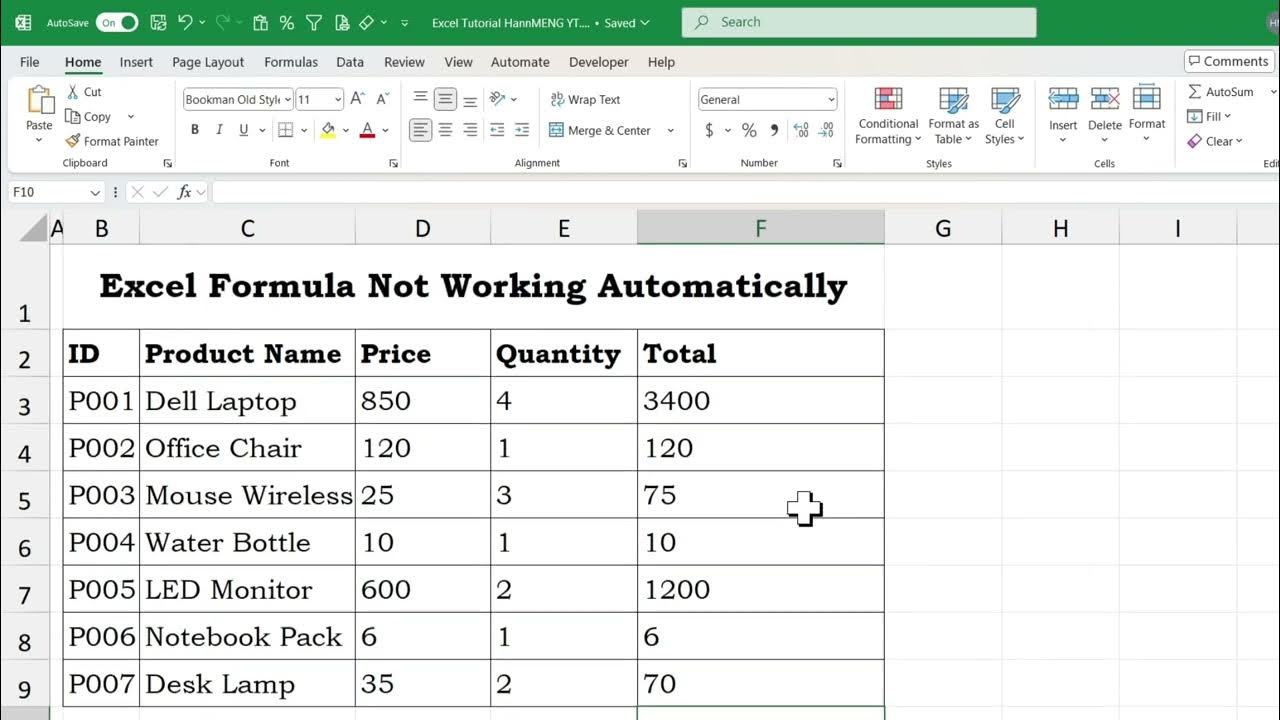
Excel is built to calculate automatically. So when you type a formula and the cell just sits there showing the formula text instead of a result, or the answer refuses to update when the source data changes, it can bring your work to a halt. The good news is that this problem is almost always caused by a setting or formatting issue, not a broken file. In this tutorial, you will learn five proven ways to fix Excel formulas that are not auto calculating, starting with the quickest checks and moving to more advanced options. By the end, you will know exactly how to get your formulas working again and understand why the issue happened in the first place.
Step 1: Turn Automatic Calculation Back On
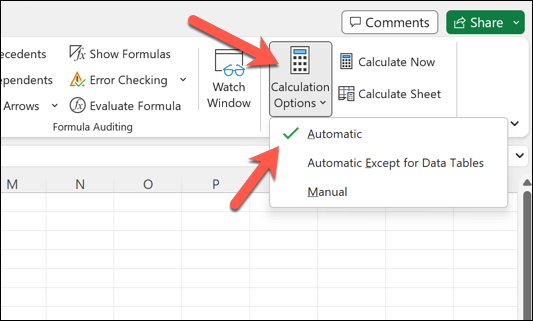
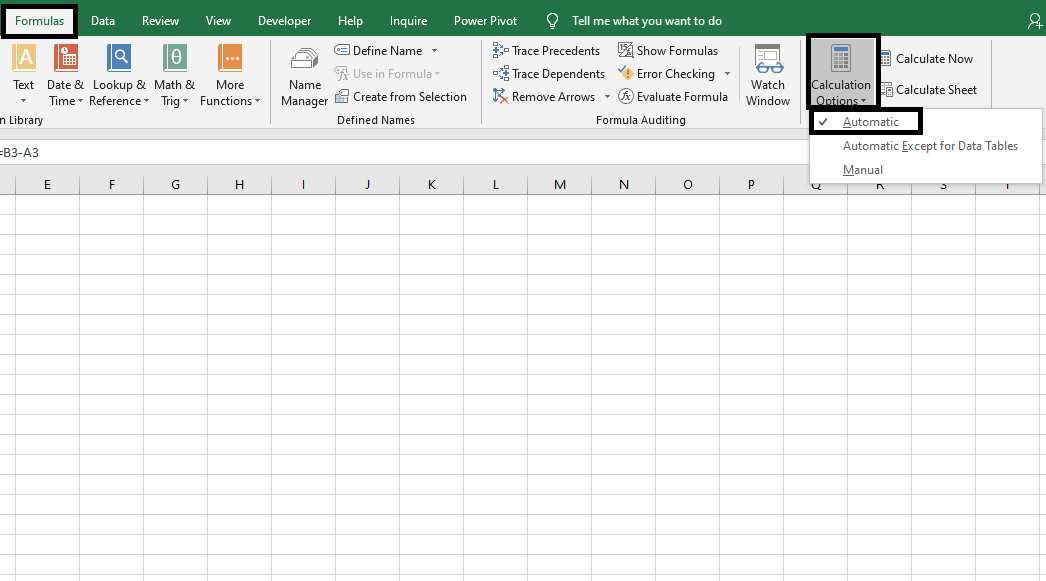
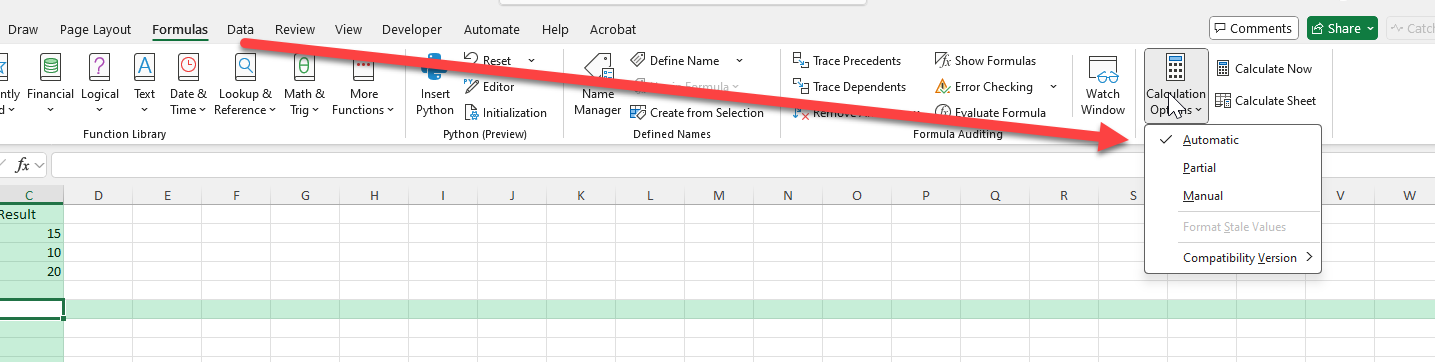
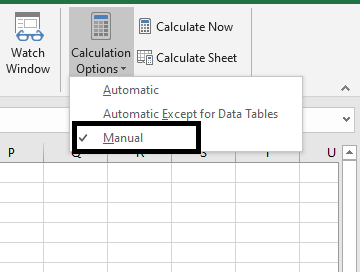
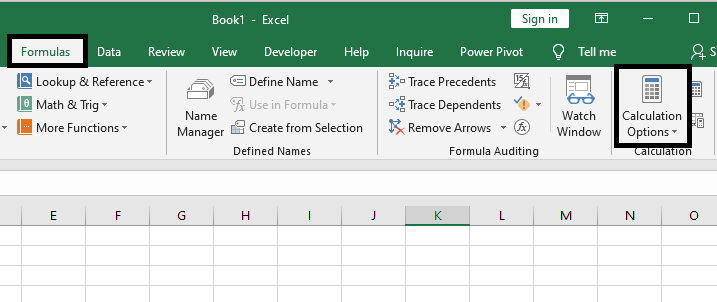
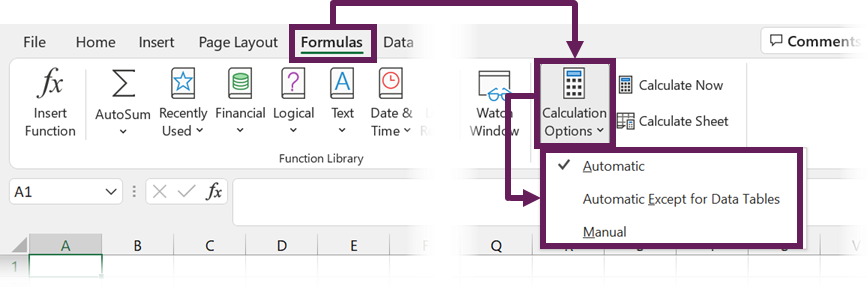
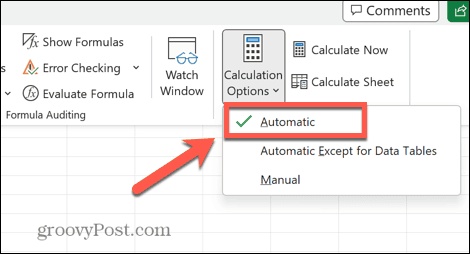
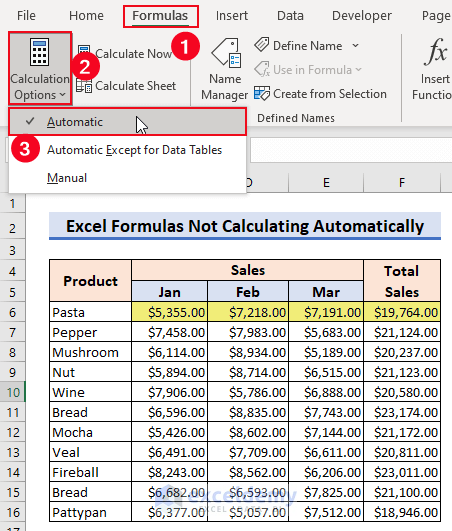
The most common cause of this problem is that Excel's calculation mode has been switched to Manual. When that happens, formulas only recalculate when you press a key, so cells appear frozen or stale. To fix it, go to the Formulas tab on the ribbon, click Calculation Options, and select Automatic. You can also check this quickly by looking at the status bar at the bottom of the window, which displays "Calculate" or "Manual" when this mode is active. Once automatic calculation is enabled, every formula in your workbook will update instantly.
Step 2: Force a Full Recalculation
If automatic calculation is already on but the results still look wrong, the workbook may simply need a refresh. Press F9 to recalculate all open workbooks, or press Shift + F9 to recalculate only the active sheet. If you are using a laptop where the function keys are combined with other actions, hold the Fn key while pressing F9. You can also trigger a full recalculation through Formulas > Calculate Now. This forces Excel to rebuild every formula and usually resolves results that seem stuck or outdated.
Step 3: Check That Calculation Is Not Disabled or Set to Manual in Options
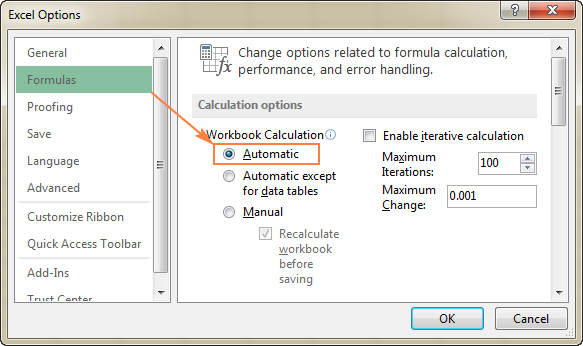
Sometimes the setting is buried deeper than the ribbon. Click File > Options > Formulas, then look under the Calculation options section. Make sure "Automatic" is selected under Workbook Calculation. Also verify that the checkbox for "Enable iterative calculation" is not causing unexpected behavior with circular references. If your workbook uses a lot of complex formulas, make sure the correct workbook is selected in the dropdown, since calculation mode can be set per workbook.
Step 4: Fix Cells Formatted as Text
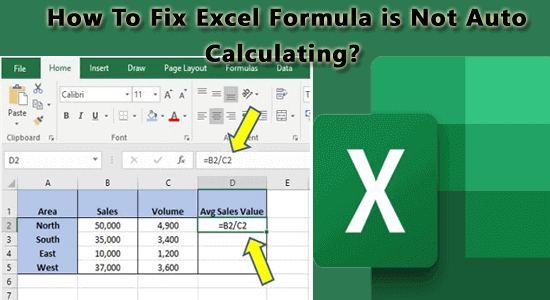
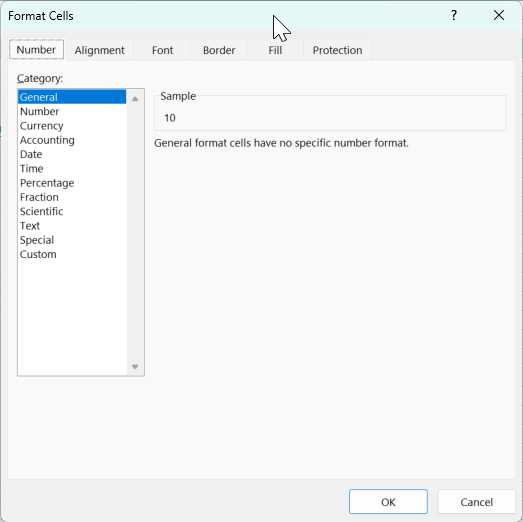
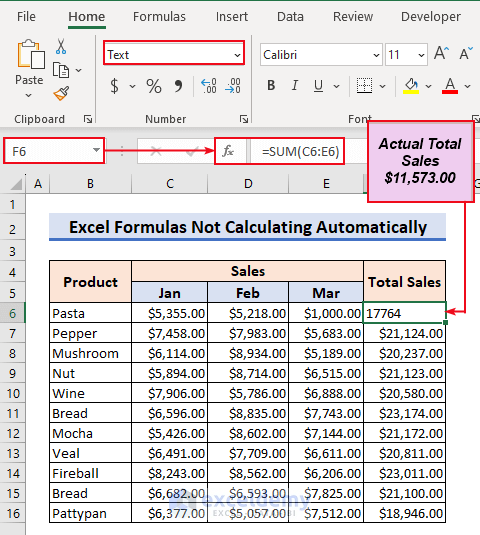
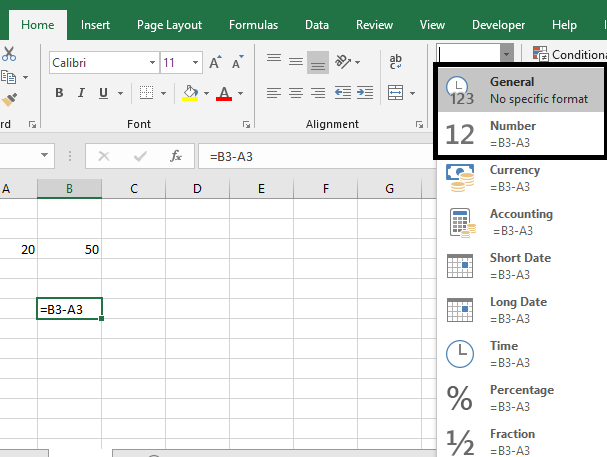
If a cell is formatted as Text before you enter a formula, Excel treats the formula as plain text and never calculates it. You will see the formula itself displayed in the cell instead of a result. To fix this, select the affected cells, go to the Home tab, open the Number Format dropdown, and choose General. Then re-enter the formula by pressing F2 and Enter. You can also use Text to Columns on the Data tab to convert a whole column back to a calculable format at once.
Step 5: Remove Leading Apostrophes and Check for Show Formulas Mode
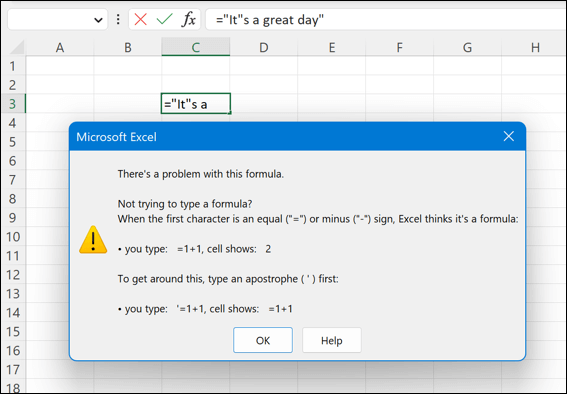
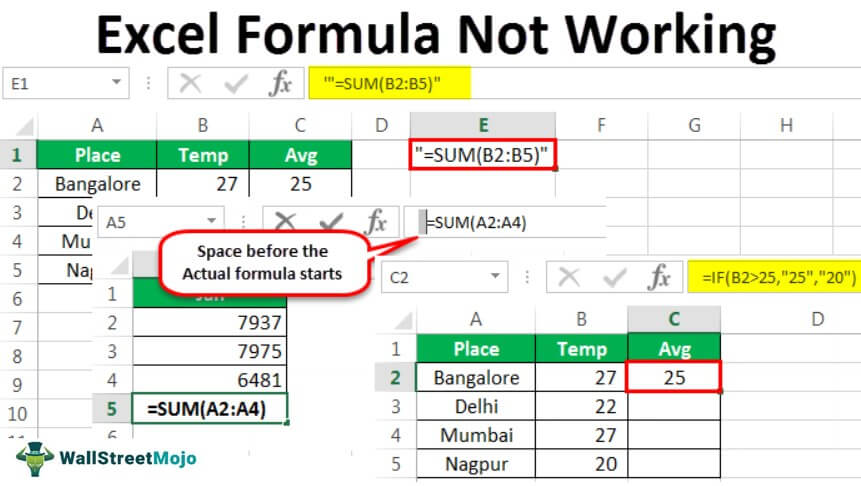
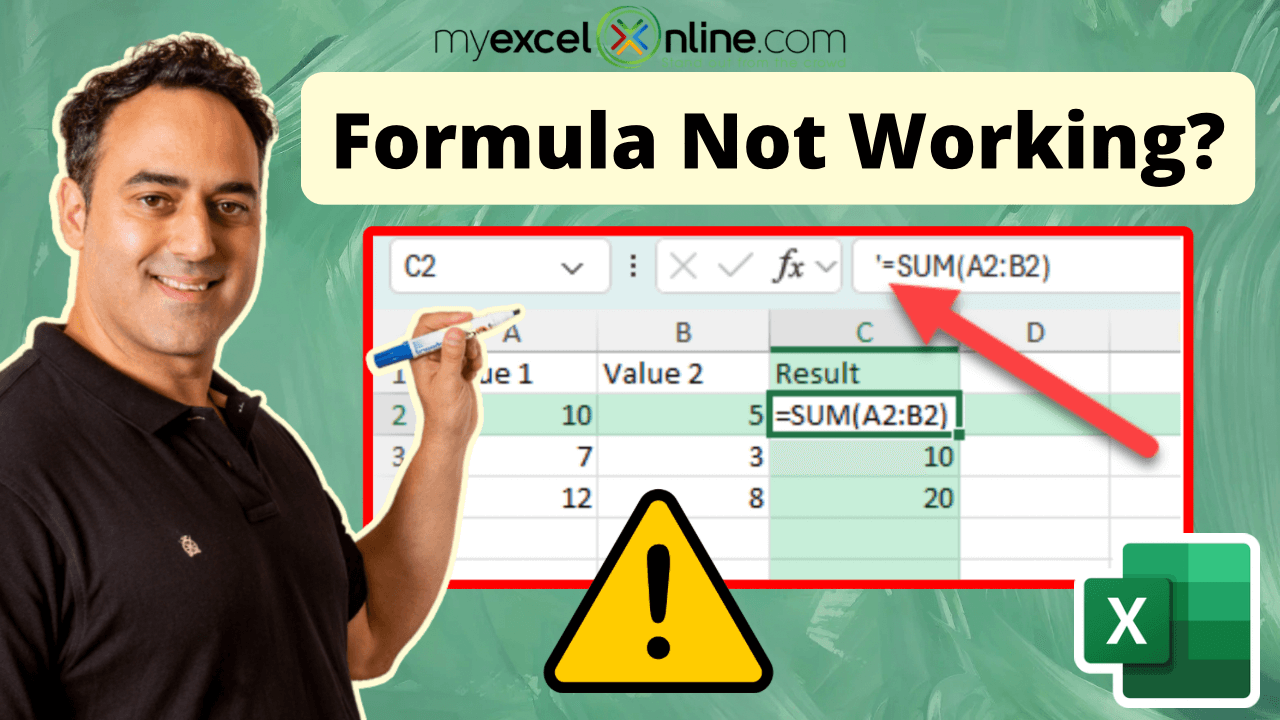
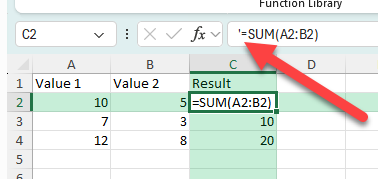
A leading apostrophe tells Excel to treat everything after it as text, so a formula entered this way will never run. Delete the apostrophe in the formula bar and press Enter to restore normal behavior. Another hidden culprit is Show Formulas mode, which displays formulas instead of results across the entire sheet. Go to the Formulas tab and toggle off Show Formulas, or press Ctrl + ` (the grave accent key). Once both issues are cleared, your calculations should display normally again.
Working through these five steps in order will resolve nearly every case of Excel formulas failing to auto calculate. If the problem persists after all of them, try opening the file on another computer or repairing the workbook through File > Open and Recover, since a corrupted file can also interfere with calculations.
How To Fix Excel Formula Not Calculating– A Comprehensive Guide

How to Fix Excel Formula Not Calculating– A Comprehensive Guide
How To Fix Excel Formulas Not Calculating (Refresh Formulas)
How to fix Excel formulas not calculating (Refresh Formulas)
HOW TO FIX FORMULAS NOT CALCULATING IN EXCEL - YouTube

HOW TO FIX FORMULAS NOT CALCULATING IN EXCEL - YouTube
10 Reasons For Excel Formulas Not Working And How To Fix 707x512
10 Reasons For Excel Formulas Not Working And How To Fix 707x512
How To Fix: Excel Not Calculating Formulas - YouTube

How to Fix: Excel Not Calculating Formulas - YouTube
Excel Formulas Not Calculating? 7 Fixes

Excel Formulas Not Calculating? 7 Fixes
Excel Formulas Not Working, Not Calculating: Quick Ways To Fix Them
Excel Formulas not Working, not Calculating: Quick Ways to Fix Them ...
Excel Formulas Not Working - Step By Step Guide To Fix It

Excel Formulas Not Working - Step by Step Guide to Fix it
How To Fix Excel Formulas That Are Not Calculating Or Updating - Excel

How to Fix Excel Formulas that are Not Calculating or Updating - Excel ...
How To Fix Excel Formulas Not Calculating – Step By Step Guide
How to Fix Excel Formulas Not Calculating – Step by Step Guide ...
Excel Formulas Not Working– The Ultimate Fixes You Need!

Excel Formulas Not Working– The Ultimate Fixes You Need!
Excel Worksheet Formulas Not Working
Excel Worksheet Formulas Not Working
Excel Worksheet Formulas Not Working
Excel Worksheet Formulas Not Working
Excel Formulas Not Working, Not Calculating: Quick Ways To Fix Them
Excel Formulas not Working, not Calculating: Quick Ways to Fix Them ...
Excel Worksheet Formulas Not Working
Excel Worksheet Formulas Not Working
Excel Formulas Not Working: How To Fix Formulas Not Updating Or Not

Excel formulas not working: how to fix formulas not updating or not ...
Excel Formulas Not Calculating? 14 Reasons & How To Fix It
Excel formulas not calculating? 14 reasons & how to fix it
Fixed Excel Formulas Not Calculating Automatically- 7 Tips

Fixed Excel Formulas Not Calculating Automatically- 7 Tips
How To Fix Excel Formulas Not Calculating – Step By Step Guide
How to Fix Excel Formulas Not Calculating – Step by Step Guide ...
Excel Formulas Not Calculating, Working, Or Updating? 8 Proven Fixes Here!
Excel Formulas Not Calculating, Working, or Updating? 8 Proven Fixes Here!
Excel Sheet Formulas Not Calculating – QXYVRS
Excel Sheet Formulas Not Calculating – QXYVRS
Excel Workbook Formulas Not Calculating How To Fix Them – Artofit

Excel workbook formulas not calculating how to fix them – Artofit
Como Inserir Tabela Do Excel Not Calculating Correctly Identify

Como Inserir Tabela Do Excel Not Calculating Correctly Identify
How To Fix Excel Formulas Not Calculating – Step By Step Guide
How to Fix Excel Formulas Not Calculating – Step by Step Guide ...
How To Fix Excel Formula Not Calculating– A Comprehensive Guide

How to Fix Excel Formula Not Calculating– A Comprehensive Guide
Fix Excel Formula Not Calculating Automatically (Quick Guide) - YouTube
Fix Excel Formula Not Calculating Automatically (Quick Guide) - YouTube
How To Fix Excel Formula Not Calculating– A Comprehensive Guide

How to Fix Excel Formula Not Calculating– A Comprehensive Guide
How To Fix Excel Formulas Not Calculating – Step By Step Guide
How to Fix Excel Formulas Not Calculating – Step by Step Guide ...
Excel Formulas Not Calculating Automatically (6 Possible Solutions)
Excel Formulas Not Calculating Automatically (6 Possible Solutions)
Excel Worksheet Formulas Not Working

Excel Worksheet Formulas Not Working
Excel Formula Not Working How To Fix It – Artofit

Excel formula not working how to fix it – Artofit
Excel Formulas Not Calculating? 14 Reasons & How To Fix It
Excel formulas not calculating? 14 reasons & how to fix it
Excel Formulas Not Working, Not Updating, Not Calculating – HUQC
Excel Formulas Not Working, Not Updating, Not Calculating – HUQC