← How to Fix Chrome Using Too Much Memory: 13 Simple Solutions How to Fix Discord Mic Not Working: Step-by-Step Guide →
When Gmail stops receiving emails, the interruption can affect communication with clients, colleagues, and critical services. This tutorial explains the most common technical causes of inbound mail failure and provides a structured troubleshooting sequence. You will learn how to inspect filters, verify forwarding and POP/IMAP settings, review storage limits, check spam and blocked addresses, validate DNS records, and test account behavior. Each step includes a targeted action so you can isolate the fault and restore normal message delivery.
Step 1: Inspect Filters and Blocked Addresses
Gmail filters can silently archive, delete, or mark incoming messages as read, which makes it appear that no email is arriving. Open Gmail in a browser, click the gear icon, select See all settings, and navigate to Filters and Blocked Addresses. Review every filter for conditions such as from:, to:, subject:, or has the words that may match legitimate senders. Delete or edit any filter that routes mail away from the inbox. Next, check the Blocked addresses section and remove any entries that should be allowed to deliver messages.
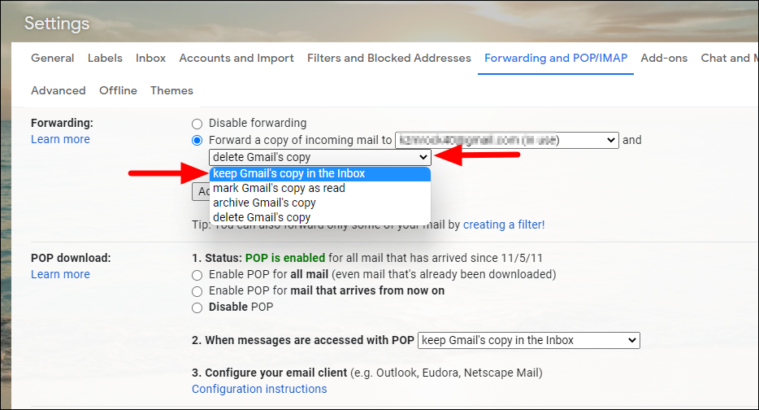
Step 2: Verify Forwarding and POP/IMAP Configuration
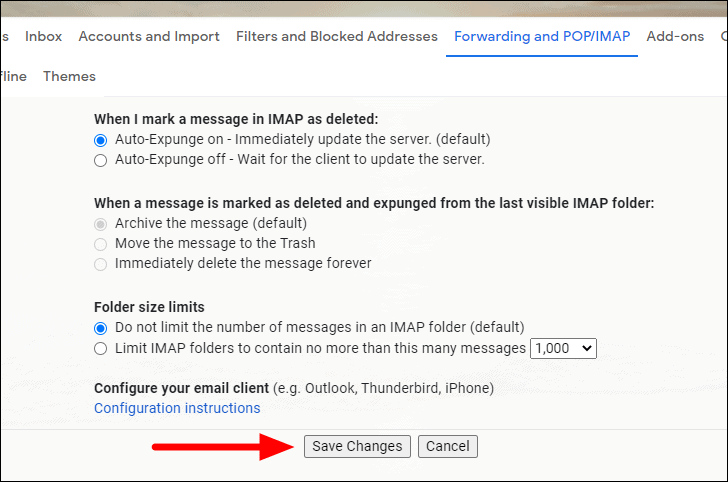
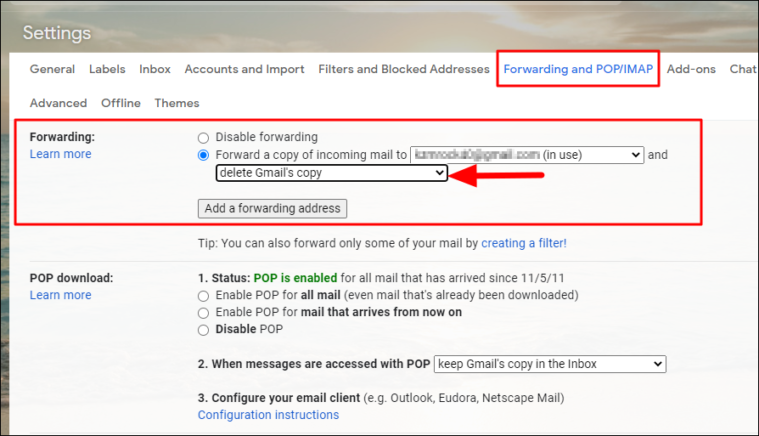
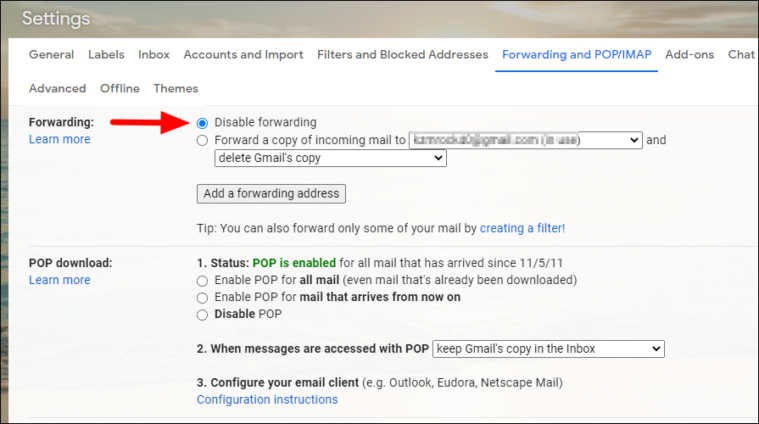
Incorrect forwarding rules can divert all incoming mail to another account before it reaches your inbox. In Gmail settings, open the Forwarding and POP/IMAP tab. Confirm that forwarding is either disabled or pointed to the correct destination address. If forwarding is enabled and the target mailbox is full or misconfigured, messages may be dropped. Also verify that POP and IMAP are set according to your client requirements. If you use a third-party mail client, ensure IMAP is enabled and that the client is not applying its own server-side deletion rules.
Step 3: Check Storage Quota and Account Status
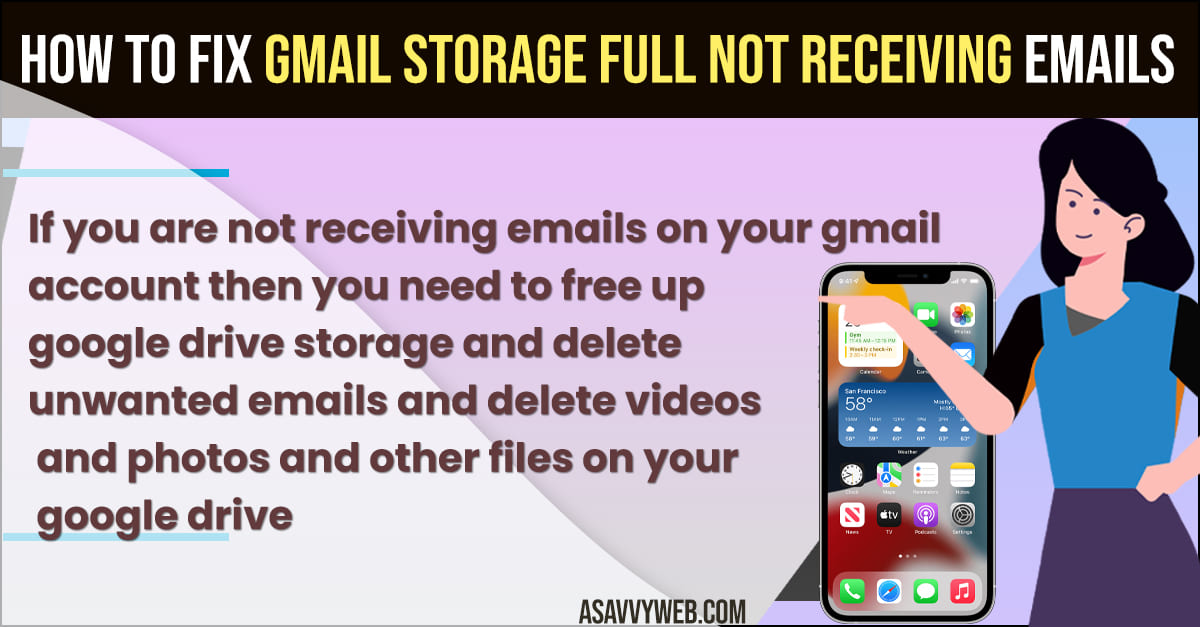
Gmail stops receiving new messages when the account exceeds its storage quota. Scroll to the bottom of the Gmail inbox to view the storage indicator, or visit Google One storage management. If the quota is full, delete large attachments, empty the Trash, and clear Spam. In Google Workspace, an administrator may have suspended the account or enforced a retention policy that blocks inbound delivery. Confirm the account is active and that no admin-level restriction is preventing incoming mail.
Step 4: Review Spam, Categories, and Search Operators
Messages may be delivered but hidden by classification. Check the Spam and Trash labels, then inspect the Promotions, Social, and Updates tabs. Use the Gmail search operator in:anywhere followed by a sender address to locate messages across all labels. If a legitimate sender is consistently routed to Spam, open the message, click Not spam, and create a filter to force future delivery to the inbox. This step distinguishes a delivery failure from a visibility problem.

Step 5: Validate DNS and Domain Authentication Records
If you use a custom domain with Gmail, inbound mail depends on correct MX records. Log in to your domain registrar or DNS provider and confirm that the MX records point to gmail-smtp-in.l.google.com and the associated Google mail servers with the correct priority values. Missing or incorrect MX records cause all inbound mail to fail. Additionally, verify SPF, DKIM, and DMARC records; while these primarily affect outbound deliverability, misconfigured authentication can cause receiving servers to reject or quarantine messages before they reach Gmail.
Step 6: Test with an Alternate Sender and Review Security Settings
Send a test message from a different email provider, such as Outlook or Yahoo, to your Gmail address. If the test arrives, the issue is specific to the original sender or their domain. If it does not arrive, check Google Account Security for recent alerts, suspicious sign-ins, or a temporary lock. Also review any third-party app passwords or less secure app settings that may have been revoked. As a final measure, remove and re-add the Gmail account on mobile devices and mail clients to reset synchronization tokens and force a fresh connection to the server.
( 2024 Fixes) How To Fix Gmail Not Receiving Emails Problem (4 Ways

( 2024 Fixes) How to Fix Gmail Not Receiving Emails Problem (4 Ways ...
How To Fix Gmail Not Receiving Emails 2025 | Can't Receive Emails On

How to Fix Gmail not receiving emails 2025 | Can't receive emails on ...
Gmail Not Receiving Emails? Here's How To Fix It

Gmail Not Receiving Emails? Here's How To Fix It
How To Fix Gmail Not Receiving Emails - 2026 || Can't Recive Emails On
How To Fix Gmail Not Receiving Emails - 2026 || Can't Recive Emails on ...
How To Fix Gmail Not Receiving Emails | Not Receiving Emails Gmail

how to fix gmail not receiving emails | not receiving emails Gmail ...
HOW TO FIX GMAIL NOT RECEIVING EMAILS - YouTube

HOW TO FIX GMAIL NOT RECEIVING EMAILS - YouTube
How To Fix Gmail Not Receiving Emails | Troubleshooting Guide - YouTube

How to Fix Gmail Not Receiving Emails | Troubleshooting Guide - YouTube
How To Fix Gmail Not Receiving Emails 2025 || Can’t Receive Emails On

How to Fix Gmail Not Receiving Emails 2025 || Can’t Receive Emails on ...
Gmail Not Receiving Emails? Here’s How To Fix It [2024] - YouTube
![Gmail Not Receiving Emails? Here’s How To Fix It [2024] - YouTube](https://i.ytimg.com/vi/5zVp4_IaPPw/maxresdefault.jpg)
Gmail Not Receiving Emails? Here’s How To Fix It [2024] - YouTube
6 Ways To Fix Gmail Not Receiving Emails Issue
6 Ways to Fix Gmail Not Receiving Emails Issue
How To Fix Gmail Not Receiving Emails — Step-by-Step Guide - YouTube

How to Fix Gmail Not Receiving Emails — Step-by-Step Guide - YouTube
How To Fix Gmail Not Receiving Emails – Quick Fix - YouTube
How to Fix Gmail Not Receiving Emails – Quick Fix - YouTube
Gmail Not Receiving Emails: How To Fix?

Gmail Not Receiving Emails: How to Fix?
Gmail Not Receiving Emails? Here's How To Fix It

Gmail Not Receiving Emails? Here's How To Fix It
6 Ways To Fix Gmail Not Receiving Emails Issue
6 Ways to Fix Gmail Not Receiving Emails Issue
How To Fix Gmail Not Receiving Emails Issues ! - YouTube

How To Fix Gmail Not Receiving Emails Issues ! - YouTube
How To Fix Gmail Not Receiving Emails 2025 | Can't Recive Emails On

How To Fix Gmail Not Receiving Emails 2025 | Can't Recive Emails on ...
How To Fix Gmail Not Receiving Emails Issues (Easy Guide) - YouTube

How to Fix Gmail Not Receiving Emails Issues (Easy Guide) - YouTube
6 Ways To Fix Gmail Not Receiving Emails Issue
6 Ways to Fix Gmail Not Receiving Emails Issue
How To Fix Gmail Not Receiving Emails - 2025 || Can't Recive Emails On

How To Fix Gmail Not Receiving Emails - 2025 || Can't Recive Emails on ...
How To Fix Gmail Not Receiving Emails Issues! (New Update) | Can't

How To Fix Gmail Not Receiving Emails Issues! (New Update) | Can't ...
How To Fix Gmail Not Receiving Emails Issues - Easy Guide - YouTube

How To Fix Gmail Not Receiving Emails Issues - Easy Guide - YouTube
How To Fix Gmail Not Receiving Emails Issues - YouTube

How To Fix Gmail Not Receiving Emails Issues - YouTube
Troubleshooting Guide: How To Fix Gmail Not Receiving Emails Issue

Troubleshooting Guide: How to Fix Gmail Not Receiving Emails Issue ...
How To Fix Gmail Not Receiving Emails 2025 || Can't Recive Emails On

How To Fix Gmail Not Receiving Emails 2025 || Can't Recive Emails on ...
What To Do If You Are Not Receiving Emails In Gmail

What To Do If You Are Not Receiving Emails In Gmail
How To Fix Gmail Not Receiving Emails (Tutorial 2025) - YouTube

How to Fix Gmail Not Receiving Emails (Tutorial 2025) - YouTube
How To Fix Gmail Not Receiving Emails - 2026 || Can't Recive Emails On

How To Fix Gmail Not Receiving Emails - 2026 || Can't Recive Emails on ...
How To Fix Gmail Storage Full Not Receiving Emails - A Savvy Web
How to Fix Gmail Storage Full Not Receiving Emails - A Savvy Web
How To Fix Gmail Not Receiving Emails (Quick Fix) - YouTube

How to Fix Gmail Not Receiving Emails (Quick Fix) - YouTube
How To Fix Gmail Not Receiving Emails - 2025 || Can't Recive Emails On

How To Fix Gmail Not Receiving Emails - 2025 || Can't Recive Emails on ...
How To Fix Gmail Not Receiving Email [2022] || Fix Can't Receive Emails
![How to Fix Gmail Not Receiving Email [2022] || Fix Can't Receive Emails](https://i.ytimg.com/vi/Ur7i3qQ_6lQ/maxresdefault.jpg)
How to Fix Gmail Not Receiving Email [2022] || Fix Can't Receive Emails ...