← How to Recover Unsent Messages on Slack: Step-by-Step Guide How to Fix Skype Camera Not Working on Windows 10: A Step-by-Step Guide →
If you rely on Slack for team communication, missing notifications can disrupt your workflow and cause you to overlook important messages. Many Windows 11 users encounter issues where Slack notifications fail to appear, remain silent, or do not display badges properly. This tutorial provides a comprehensive, step-by-step approach to diagnosing and resolving Slack notification problems on Windows 11. By following these steps, you will restore reliable alerts and ensure you never miss a critical update again.
Step 1: Verify Slack Notification Preferences
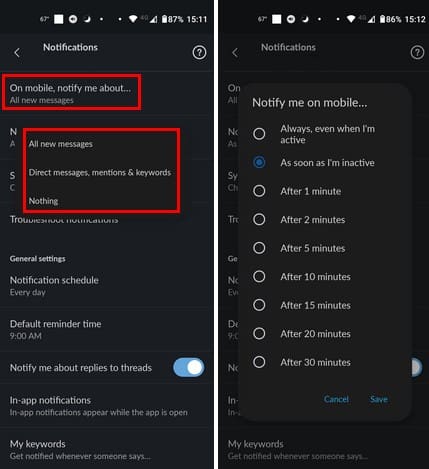
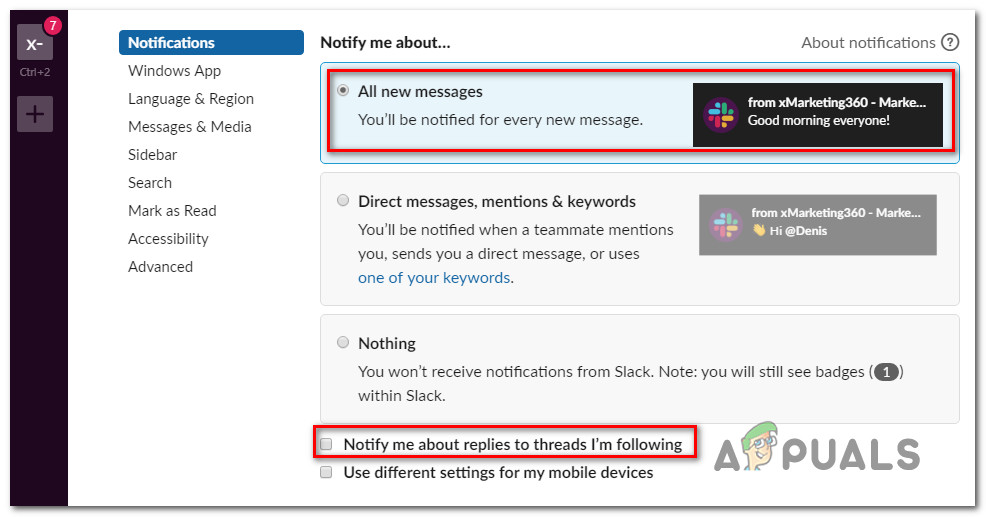
The first step is to confirm that Slack itself is configured to send notifications. Open the Slack desktop application and click on your profile picture in the top-right corner. Select "Preferences" from the menu, then navigate to the "Notifications" tab. Ensure that "Notify me about" is set to "All new messages" or a suitable option. Also, check that "Deliver notifications" is set to "Via desktop and mobile" or at least "Via desktop." Under the "Sound & Appearance" section, verify that a notification sound is selected and that "Show a badge on Slack's icon" is enabled. If these settings are disabled or set to "Do Not Disturb," notifications will not work. Adjust them accordingly and test by sending yourself a direct message.
Step 2: Check Windows 11 Notification Settings for Slack
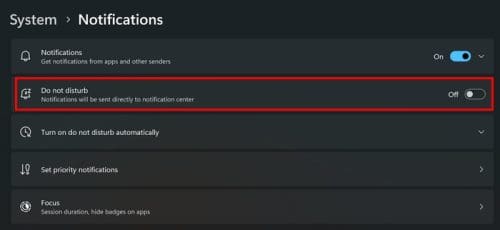
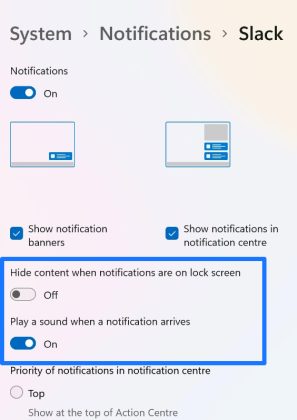
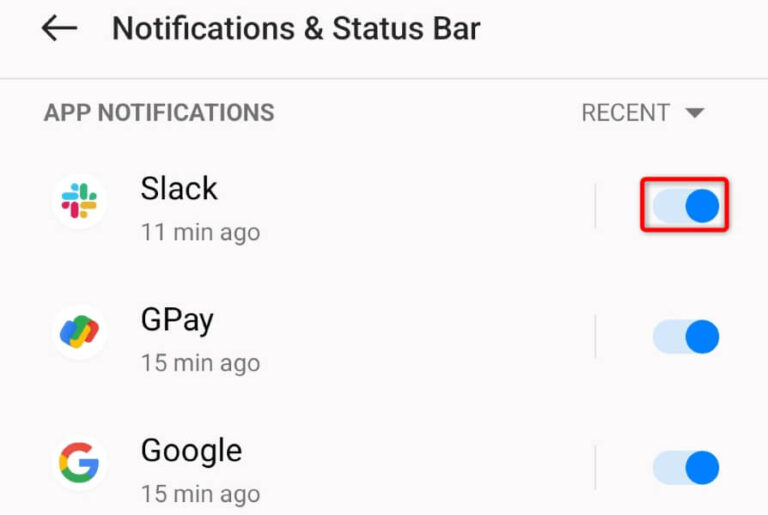
Even if Slack is configured correctly, Windows 11 may be blocking its notifications. Press the Windows key + I to open Settings, then go to "System" and select "Notifications." Scroll down to find Slack in the list of apps. Ensure the toggle next to Slack is turned on. Click the arrow to expand Slack's settings and verify that "Show notification banners," "Show notifications in notification center," and "Play a sound" are all enabled. Additionally, confirm that "Do Not Disturb" or "Focus assist" is not active. If it is, turn it off or add Slack to the priority list. These system-level permissions are critical for Slack alerts to appear.
Step 3: Ensure Slack Is Not Set to Do Not Disturb
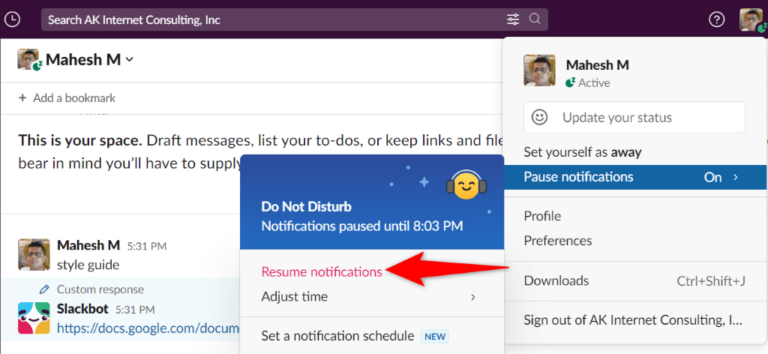
Slack has its own Do Not Disturb (DND) mode that can override all notification settings. Check the status icon next to your name in the Slack sidebar. If it shows a crescent moon or the text "Do Not Disturb," click it and select "Set yourself to active." You can also schedule DND hours in Preferences > Notifications > Do Not Disturb. Make sure no schedule is currently active that would silence notifications. If you use Slack on multiple devices, verify that DND is not enabled on another device, as it can sync across sessions. Once DND is disabled, test notifications again.

Step 4: Restart Slack and Windows Explorer
Sometimes, a temporary glitch in Slack or Windows Explorer prevents notifications from displaying. First, completely exit Slack by right-clicking its system tray icon and selecting "Quit Slack." Then reopen it. If the issue persists, restart Windows Explorer: press Ctrl + Shift + Esc to open Task Manager, locate "Windows Explorer" under Processes, right-click it, and choose "Restart." This refreshes the taskbar and notification area. After restarting both Slack and Windows Explorer, send a test message to yourself or ask a colleague to message you. If notifications appear, the problem was likely a transient software bug.
Step 5: Update or Reinstall Slack
An outdated or corrupted Slack installation can cause notification failures. Open the Microsoft Store or visit the official Slack website to check for updates. If you installed Slack via the Microsoft Store, go to Library and click "Get updates." For the standalone version, download the latest installer from Slack's website and run it. If updating does not help, uninstall Slack completely via Settings > Apps > Installed apps, then reinstall it. After reinstalling, sign in and reconfigure your notification preferences as described in Step 1. This ensures a clean installation with no conflicting files that could block alerts.
Step 6: Disable Focus Assist and Check Group Policy
Windows 11's Focus Assist (now called Do Not Disturb) can silently suppress notifications. Go to Settings > System > Focus assist (or Notifications > Focus assist) and set it to "Off." If you are on a corporate network, group policies might disable Slack notifications. Check with your IT administrator if the issue persists after all local changes. Additionally, ensure that Slack is allowed to run in the background: go to Settings > Privacy & security > Background apps and confirm Slack is enabled. Finally, run the Windows Store Apps troubleshooter if you installed Slack from the Store. These advanced steps resolve deeper system conflicts that affect notification delivery.
How To Fix Slack Notifications Not Working - Technipages
How to Fix Slack Notifications Not Working - Technipages
How To Fix Slack Notifications Not Working - Technipages
How to Fix Slack Notifications Not Working - Technipages
How To Fix Slack Notifications Not Working (2026 Quick & Easy Fix
How to Fix Slack Notifications Not Working (2026 Quick & Easy Fix ...
[19 Methods]- Fix Slack Notifications Not Working On Android
![[19 Methods]- Fix Slack Notifications Not Working On Android](https://android-ios-data-recovery.com/wp-content/uploads/2022/12/Fix-Slack-Notifications-Not-Working-On-Android-768x384.jpg)
[19 Methods]- Fix Slack Notifications Not Working On Android
7 Ways To Fix Slack Notifications Not Working

7 Ways to Fix Slack Notifications Not Working
How To Fix Slack Notifications Not Working - YouTube

How To Fix Slack Notifications Not Working - YouTube
Fix: Slack Notifications Not Working
Fix: Slack Notifications not Working
How To Fix Slack Notifications Not Working

How to Fix Slack Notifications Not Working
17 Best Fixes For Slack Notifications Not Working On Mobile - TechWiser
17 Best Fixes for Slack Notifications Not Working on Mobile - TechWiser
How To Fix Slack Notifications Not Working (2026 Step-by-Step

How to Fix Slack Notifications Not Working (2026 Step-by-Step ...
Fix: Slack Notifications Not Working On Windows 11

Fix: Slack Notifications Not Working on Windows 11
How To Fix Slack Notifications Not Working- Mac, IPhone & PC
How to Fix Slack Notifications Not Working- Mac, iPhone & PC
Fix: Slack Notifications Not Working
Fix: Slack Notifications not Working
How To Fix Slack Notifications Not Working 2026 (Quick Fix!) - YouTube
How To Fix Slack Notifications Not Working 2026 (Quick Fix!) - YouTube
How To Fix Slack Notifications Not Working - Technipages
How to Fix Slack Notifications Not Working - Technipages
10 Ways To Fix Slack Notifications Not Working On Mac/Windows (2024)
10 Ways to Fix Slack Notifications Not Working on Mac/Windows (2024)
How To Fix Slack Notifications Not Working

How to Fix Slack Notifications Not Working
How To Fix Slack Notifications Not Working [2026 Guide] - YouTube
![How To Fix Slack Notifications Not Working [2026 Guide] - YouTube](https://i.ytimg.com/vi/31teNTnuNkY/maxresdefault.jpg)
How To Fix Slack Notifications Not Working [2026 Guide] - YouTube
How To Fix Slack Notifications Not Working - Technipages
How to Fix Slack Notifications Not Working - Technipages
[Solved] How To Fix Slack Notifications Not Working
![[Solved] How to Fix Slack Notifications Not Working](https://www.partitionwizard.com/images/uploads/2024/04/slack-notifications-not-working-thumbnail.png)
[Solved] How to Fix Slack Notifications Not Working
How To Fix Slack Notifications Not Working - Technipages

How to Fix Slack Notifications Not Working - Technipages
21 Solutions To Fix No Slack Notifications On Mac, IPhone, Web

21 solutions to fix no Slack notifications on Mac, iPhone, Web
7 Ways To Fix Slack Notifications Not Working
7 Ways to Fix Slack Notifications Not Working
How To Fix Slack Notifications Not Working | Quick And Easy Guide 2026

How To Fix Slack Notifications Not Working | Quick and Easy Guide 2026 ...
How To Fix Slack Notifications Not Working? - YouTube
How to fix Slack Notifications not working? - YouTube
21 Solutions To Fix No Slack Notifications On Mac, IPhone, Web

21 solutions to fix no Slack notifications on Mac, iPhone, Web
How To Fix Slack Notifications If They Aren't Working

How to fix Slack notifications if they aren't working
How To Fix Slack Desktop App Notifications Not Working - Whoihavetobe

How To Fix Slack Desktop App Notifications Not Working - Whoihavetobe
How To Fix Slack Notifications Not Working In Windows 11 - YouTube

How to Fix Slack Notifications Not Working in Windows 11 - YouTube
How To Fix Slack Notifications Not Working - YouTube
How To Fix Slack Notifications Not Working - YouTube
8 Ways To Fix Slack Notifications Not Working On Windows 11

8 Ways to Fix Slack Notifications Not Working on Windows 11
7 Ways To Fix Slack Notifications Not Working
7 Ways to Fix Slack Notifications Not Working
How To Fix Slack Notifications Not Working - YouTube

How To Fix Slack Notifications Not Working - YouTube